

Parts & Maintenance
"Nilfisk SC500 Solution Filter — Replace & Clean"
Learn how to inspect, clean, and replace the Nilfisk SC500 solution filter to prevent poor water flow, streaks, clogs, and scrubber downtime.
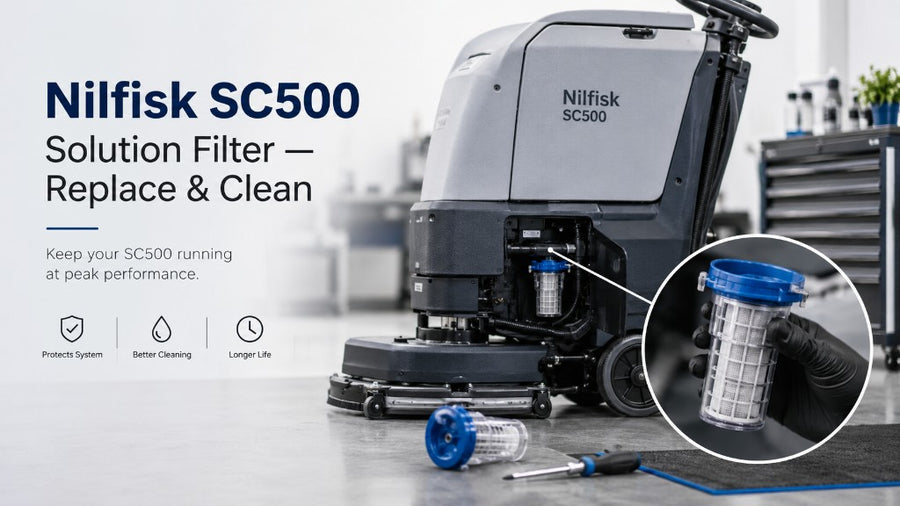


Replacement Part Guide
Use this guide to inspect, replace, and stock the right wear item for your SC500 route. Order the matching part below or view the full machine if you are adding a scrubber to your fleet.

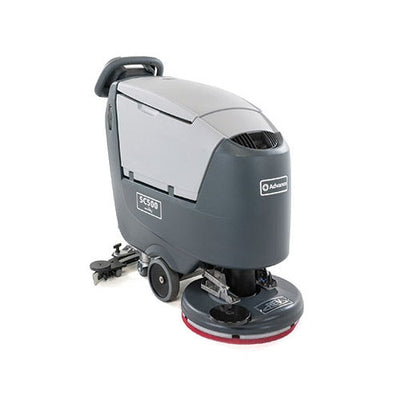
Nilfisk SC500 Solution Filter: Why It Matters
The Nilfisk SC500 is built for commercial floor cleaning, but like every walk-behind floor scrubber, it depends on clean solution flow to perform correctly. The solution filter is a small part, but it has a major job: it helps keep debris, grit, residue, and tank contamination from reaching the solution valve, hoses, and scrub deck.
When the solution filter is dirty or clogged, the machine may still turn on, move, and scrub — but the cleaning result can quickly fall apart. Operators may notice poor water flow, dry brush marks, streaks, uneven chemical delivery, or floors that look dull after scrubbing. In some cases, teams assume the issue is the brush, pad driver, chemical, or battery, when the real problem is a restricted solution filter.
For facility managers, janitorial contractors, schools, warehouses, healthcare facilities, and building service contractors, this part should not be treated as an afterthought. A dirty solution filter can reduce cleaning quality, waste labor, and create avoidable downtime. The good news is that the filter is usually simple to inspect and clean as part of routine maintenance.
This guide explains how to inspect, clean, and replace the Nilfisk SC500 solution filter, how to spot flow problems, and when to order replacement parts.
Helpful links:
- Shop the machine: Shop the SC500 machine
- Shop SC500 parts: Shop SC500 parts
- Need help choosing equipment? Equipment Finder & AI Advisor
- Request a quote: Request a quote
- Build a package: Equipment packages
What the Solution Filter Does on a Floor Scrubber
The solution filter helps protect the machine's solution delivery system. In simple terms, it screens the cleaning solution before it reaches the scrub deck. That matters because commercial scrubbers often work in dirty environments: warehouses, schools, grocery stores, kitchens, retail backrooms, industrial sites, and contractor routes.
Even when the solution tank looks clean, small particles can still enter the system. Common sources include:
- Dirt or grit from refill buckets
- Chemical residue
- Hard water deposits
- Tank scale
- Small plastic shavings or debris
- Dust from storage areas
- Residue from improper rinsing
- Contamination from leaving solution in the tank too long
Without a clean filter, debris can restrict flow or move deeper into the machine. That can create more expensive problems later. A filter is much easier to clean or replace than a clogged hose, valve, or solution control component.
For a commercial cleaning team, the solution filter helps with three things:
1. Consistent water flow
The scrub deck needs steady solution delivery to clean evenly.
2. Cleaner floor results
Uneven solution flow can leave streaks, dry paths, residue, and poor soil removal.
3. Machine protection
A clean filter helps reduce the chance of debris moving into the machine's solution system.
Signs the Nilfisk SC500 Solution Filter Needs Cleaning
A clogged or dirty solution filter does not always stop the machine immediately. Many times, the symptoms show up gradually. Operators may complain that the scrubber is "not cleaning like before," even though the batteries are charged and the brush is spinning.
Look for these warning signs:
1. Weak Solution Flow
If the machine is dispensing less solution than normal, the filter may be restricted. This can happen even when the solution tank is full.
The operator may notice:
- The floor looks too dry behind the scrub deck
- The brush or pad is not getting enough liquid
- The machine only wets part of the cleaning path
- The solution level drops slowly even during active use
2. Uneven Cleaning Path
A floor scrubber should leave a consistent scrub path. If one side looks wetter than the other, or if the machine leaves inconsistent cleaning marks, the solution filter or downstream solution path may be restricted.
Uneven cleaning can also come from worn brushes, damaged squeegee blades, clogged hoses, or wrong pad choice, but solution flow should be checked early because it is a common and easy-to-service cause.
3. Streaks or Residue After Scrubbing
A clogged filter can reduce the amount of water reaching the floor. When there is not enough solution, the machine may not properly break down soils or rinse chemical residue. The result can be streaky, dull, or sticky floors.
This is especially noticeable on:
- Polished concrete
- VCT
- Epoxy floors
- Retail floors
- School hallways
- Healthcare corridors
- Warehouse traffic lanes
4. Machine Uses Chemical But Does Not Clean Well
If the team increases chemical concentration to "fix" poor cleaning, but the machine still performs poorly, check the solution filter before using stronger chemicals. Poor flow can make good chemicals look ineffective.
5. Intermittent Flow
Sometimes the machine dispenses solution normally for a few minutes, then slows down. This can happen when debris shifts inside the filter or tank and partially blocks the system.
6. The Filter Looks Dirty During Inspection
The simplest sign is visual. If the filter screen or housing shows sediment, buildup, scale, dark residue, or debris, it should be cleaned.
How Often Should You Check the SC500 Solution Filter?
The right inspection schedule depends on how often the machine is used and what environment it cleans. A contractor using the SC500 every day in multiple buildings should inspect the filter more often than a small facility using it a few times per week.
A practical maintenance schedule:
Daily or After Each Heavy Use
Check the solution tank and recovery tank. Drain and rinse as needed. If the machine was used in a dirty environment, inspect the solution filter area for obvious debris.
Weekly
Inspect and clean the solution filter if the machine is used regularly. This is a good rhythm for schools, warehouses, retail facilities, and janitorial contractors.
Monthly
For lighter use, inspect the filter monthly. Even if the machine seems fine, this helps prevent buildup from becoming a problem.
Immediately
Check the filter immediately if you notice poor solution flow, streaking, dry scrubbing, or inconsistent cleaning performance.
A simple rule: if the machine is not putting down solution correctly, check the filter before assuming the repair is complicated.
Tools and Supplies You May Need
Most solution filter inspections are simple, but it helps to have the right supplies ready before you begin.
Recommended items:
- Clean gloves
- Safety glasses
- Small bucket or towel
- Clean water
- Soft brush
- Microfiber cloth
- Replacement solution filter if the old one is damaged
- Machine manual or parts diagram
- Flashlight
- Mild cleaner if needed
Avoid using sharp tools that can tear or distort the filter screen. Also avoid aggressive chemicals unless the manufacturer's guidance allows them. The goal is to remove debris without damaging the filter.
Safety Before Servicing the Solution Filter
Before cleaning or replacing any part on a commercial floor scrubber, follow basic safety steps.
1. Park the Machine Safely
Move the SC500 to a level surface. Avoid servicing the machine on a ramp or uneven floor.
2. Turn the Machine Off
Power down the machine before inspecting or removing parts. Do not service the filter while the machine is running.
3. Empty or Lower the Solution Tank Level
If the solution tank is full, liquid may spill when opening the filter area. Drain or reduce the solution level as needed.
4. Wear Gloves
The solution system may contain chemical residue. Gloves help protect your hands.
5. Follow the Operator Manual
The exact access point and procedure can vary by configuration. Always follow the Nilfisk/Advance operator manual and parts documentation for the specific machine.
Step-by-Step: How to Inspect the Nilfisk SC500 Solution Filter
The exact location and design may vary by model configuration, but the inspection process is generally straightforward.
Step 1: Confirm the Symptom
Before opening anything, confirm what the operator is experiencing.
Ask:
- Is the machine dispensing any solution?
- Is the flow weak or completely stopped?
- Does the problem happen immediately or after a few minutes?
- Was the tank recently filled?
- Was chemical left in the tank overnight?
- Was dirty water or debris accidentally added to the solution tank?
This helps you decide whether the filter is likely the issue or whether you also need to check hoses, valves, or controls.
Step 2: Turn Off and Secure the Machine
Switch off the machine and make sure it is stable. Remove the key if applicable. Keep the machine away from traffic while servicing it.
Step 3: Locate the Solution Filter
Find the solution filter according to the machine's manual or parts diagram. If your team does not have the diagram handy, check the parts lookup page or ask TCB for help identifying the right filter and related components.
Shop SC500 parts here: Shop SC500 parts
Step 4: Place a Towel or Container Under the Filter Area
There may be residual liquid in the line or filter housing. A towel or small container helps prevent spills.
Step 5: Remove the Filter Carefully
Remove the filter or filter cap according to the machine's design. Do not force it. If it does not move easily, check whether there is pressure, buildup, or a locking mechanism.
Step 6: Inspect the Filter Screen
Look for:
- Sand or grit
- Hair or fibers
- Chemical sludge
- White mineral scale
- Dark residue
- Cracks
- Tears
- Warping
- Missing gasket or seal
- Damaged threads or housing
If the screen is intact but dirty, clean it. If it is damaged, replace it.
Step 7: Inspect the Filter Housing
The filter itself is not the only place debris can collect. Inspect the housing, cap, gasket, and visible opening. Wipe away buildup carefully.
Step 8: Reinstall the Filter
After cleaning or replacing, reinstall the filter securely. Make sure it seats properly. Do not overtighten plastic parts.
Step 9: Test Solution Flow
Add clean water to the solution tank and test the machine in a safe area. Confirm that solution flow is consistent before returning the machine to service.
How to Clean the Nilfisk SC500 Solution Filter
Cleaning the solution filter should be gentle but thorough.
Basic Cleaning Method
1. Remove the filter according to the manual.
2. Rinse it with clean water.
3. Use a soft brush to loosen debris.
4. Rinse again until water runs clear.
5. Inspect the screen for damage.
6. Wipe the housing and gasket area.
7. Reinstall the filter.
8. Test machine flow.
What Not to Do
Do not use a screwdriver, knife, or sharp tool to scrape the filter screen. Do not use high pressure that could damage the filter. Do not reinstall a cracked or torn filter. Do not ignore a missing or damaged gasket.
When Cleaning Is Not Enough
Replace the filter if:
- The screen is torn
- The filter is cracked
- The housing is damaged
- The filter will not seat correctly
- The gasket is missing or deformed
- Flow remains poor after cleaning
- The filter clogs repeatedly after normal use
If a filter clogs again shortly after cleaning, the tank may be contaminated or there may be heavy buildup upstream.
When to Replace the SC500 Solution Filter
A solution filter is a wear and maintenance item. It does not need replacement every time it is dirty, but it should be replaced when cleaning cannot restore proper function.
Replace the filter when you see:
- Damaged mesh
- Cracks in the plastic
- Deformed filter body
- Stripped threads
- Leaking around the housing
- Missing seal
- Persistent clogging
- Restricted solution flow after cleaning
For janitorial contractors, it is smart to keep common SC500 maintenance parts in stock. A missing filter can take a machine out of service. A spare filter is inexpensive compared with downtime, return trips, or poor cleaning results at a client site.
Shop SC500 parts: Shop SC500 parts
Troubleshooting Poor Solution Flow After Cleaning the Filter
If you clean or replace the filter and the SC500 still has poor solution flow, continue troubleshooting.
Check the Solution Tank
Look inside the solution tank. If there is debris, sediment, or chemical sludge, the filter may clog again. Drain and rinse the tank.
Check the Solution Setting
Make sure the machine is set to dispense solution. Sometimes the issue is an operator setting, not a mechanical restriction.
Check the Brush Deck Area
Debris around the scrub deck can make it seem like the machine is not cleaning properly. Make sure the brush or pad is installed correctly.
Check the Hoses
A kinked, clogged, or disconnected hose can restrict flow. Inspect visible hose routing and connections.
Check for Air Locks or Blockage
If the tank was run dry or serviced recently, make sure the system is flowing properly after refill.
Check the Chemical
Thick, incompatible, or improperly mixed chemicals can contribute to clogging. Use chemicals designed for automatic scrubbers and follow dilution instructions.
Check for Hard Water Buildup
In areas with hard water, mineral scale may collect in the system. If scale is visible, follow approved cleaning procedures.
Get Help if the Problem Continues
If the machine still will not dispense solution correctly, it may need deeper service. Talk to an equipment expert before replacing multiple parts.
Talk to an expert: Equipment Finder & AI Advisor
Request a quote: Request a quote
Operator Checklist: Preventing Future Clogs
Use this checklist to reduce solution filter problems:
- Drain unused solution after use when appropriate
- Rinse the solution tank regularly
- Use clean water when filling the machine
- Avoid pouring debris into the solution tank
- Use approved automatic scrubber chemicals
- Follow dilution instructions
- Inspect the filter weekly for heavy-use machines
- Clean the filter after dusty or dirty jobs
- Keep spare filters available
- Train operators to report weak solution flow early
A solution filter problem is easier to fix when caught early. If the operator keeps using the machine with poor solution flow, the cleaning result suffers and the team may waste time re-cleaning.
What Facility Managers Should Know
Facility managers often look at the final floor result, not the individual machine parts. But the solution filter directly affects the result. If a scrubber is leaving dry streaks, failing to break down soil, or requiring multiple passes, the solution filter should be part of the first inspection.
For in-house teams, add the filter to the weekly machine care checklist. For contractors, add it to route maintenance. If multiple employees use the same SC500, make sure someone is clearly responsible for draining, rinsing, and checking the machine.
A clean filter supports:
- Better cleaning consistency
- Fewer complaints
- Less downtime
- Better chemical performance
- Longer machine life
- More predictable operator results
What Janitorial Contractors Should Know
Contractors depend on uptime. A machine that fails during a night route can delay the whole schedule. Solution filter maintenance should be part of your route-prep process.
Before sending the SC500 to a job, check:
- Battery charge
- Recovery tank condition
- Solution tank condition
- Squeegee blades
- Brushes or pads
- Vacuum hose
- Solution filter
- Charger
- Required chemicals
- Spare wear parts
If your team services multiple SC500 machines, standardize the parts list. Keep filters, squeegee blades, hoses, brushes, and pad drivers organized by machine model. This avoids last-minute guessing.
Need help building a parts kit?
Shop parts: Shop SC500 parts
Build a package: Equipment packages
Common Mistakes to Avoid
Mistake 1: Only Checking the Recovery System
Operators often focus on dirty water pickup problems, such as squeegee blades and vacuum hoses. Those are important, but solution delivery matters too. A scrubber cannot clean properly if it does not put enough solution on the floor.
Mistake 2: Using Dirty Fill Buckets
A dirty bucket can send debris straight into the solution tank. Use clean water sources and clean containers.
Mistake 3: Leaving Chemical in the Tank Too Long
Chemical residue can settle, thicken, or contribute to buildup. Follow the manufacturer's guidance for draining and rinsing.
Mistake 4: Reinstalling a Damaged Filter
If the filter is torn, cracked, or no longer seals correctly, cleaning it will not solve the problem.
Mistake 5: Increasing Chemical Instead of Fixing Flow
If the machine is not dispensing enough solution, stronger chemical will not solve the root cause. Fix the flow first.
CTA: Shop Nilfisk SC500 Solution Filters and Parts
Need replacement parts for your SC500?
Shop parts: Shop SC500 parts
TCB can help you identify the right solution filter, squeegee blades, hoses, brushes, pad drivers, and maintenance items for your machine.
CTA: Request a Quote for SC500 Parts or Equipment
If you are buying parts for multiple machines, building a maintenance kit, or comparing repair versus replacement, request a quote.
Request a quote: Request a quote
Include your machine model, serial number if available, part number if known, and a description of the issue.
CTA: Talk to an Expert
Not sure whether the issue is the filter, hose, valve, brush deck, or squeegee system?
Talk to an expert: Equipment Finder & AI Advisor
Tell us what the machine is doing, what floor type you clean, and what symptoms you see. We can help point you toward the next step.
FAQ: Nilfisk SC500 Solution Filter
1. How do I know if the Nilfisk SC500 solution filter is clogged?
Common signs include weak solution flow, dry streaks, uneven scrubbing, poor chemical performance, or a machine that seems to clean inconsistently. If the tank has solution but the scrub deck is not getting enough liquid, inspect the solution filter.
2. Can I clean the SC500 solution filter instead of replacing it?
Yes, if the filter is dirty but not damaged. Rinse it with clean water and use a soft brush if needed. Replace it if the screen is torn, the housing is cracked, the gasket is damaged, or flow does not improve after cleaning.
3. How often should I clean the solution filter?
For heavy commercial use, inspect it weekly or whenever solution flow changes. For lighter use, monthly inspection may be enough. Always check it immediately if the machine leaves dry marks or stops dispensing solution correctly.
4. What causes the solution filter to clog?
Common causes include dirty fill water, debris in the solution tank, chemical residue, hard water scale, dust, or failure to rinse the tank. Using clean water and approved chemicals helps reduce clogging.
5. Where can I buy Nilfisk SC500 replacement parts?
You can shop SC500 parts at Shop SC500 parts. If you are not sure which filter or part fits your machine, use Equipment Finder & AI Advisor or request help through Request a quote.
Final Takeaway
The Nilfisk SC500 solution filter is a small part with a big impact on cleaning performance. When it is clean, the scrubber can deliver solution evenly, support better soil removal, and help operators achieve consistent results. When it is clogged, the machine may leave streaks, dry paths, residue, and poor cleaning results.
For commercial cleaning teams, the best approach is simple: inspect the filter regularly, clean it before problems become serious, replace it when damaged, and keep spare parts available. This prevents downtime and keeps the SC500 ready for daily floor care work.
Need help with SC500 parts or equipment support?
- Shop parts: Shop SC500 parts
- View SC500 machine: Shop the SC500 machine
- Ask AI Advisor: Equipment Finder & AI Advisor
- Request a quote: Request a quote
- Build a package: Equipment packages
Need the right part?


Built for performance. Backed by experts.
Keep Your Equipment Running Strong
Genuine parts, expert support, and reliable equipment to keep your business moving forward.
- Fast Shipping Quick delivery from U.S. warehouses
- Expert Support Real people. Real solutions. We're here to help.
- 30-Day Returns Hassle-free returns on eligible items
- Secure Payments Shop with confidence. Your information is safe.
- 100% Satisfaction We stand behind our products and service.
